Catherine Chadwick, Project Manager for Ballen Brands, shows you how to create a main page menu slider, and where you need to input the information so that it shows up on the main page of your BREW (Ballen Real Estate Website).
This post contains some affiliate links for your convenience. Click here to read my full disclosure policy.
Create a Menu in WordPress
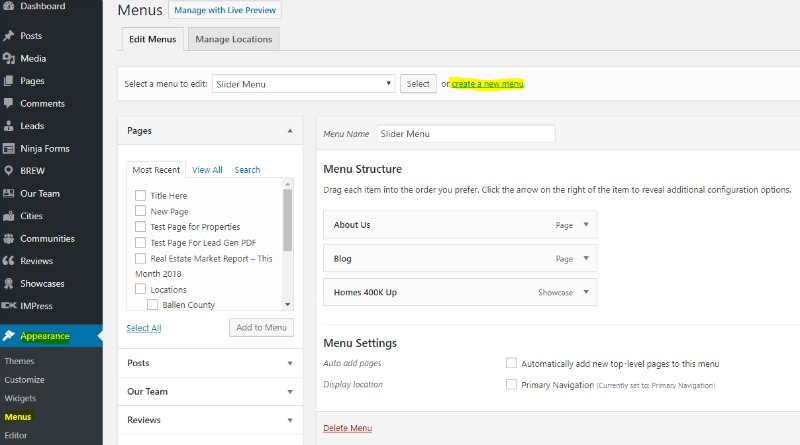
Log in to your WordPress Dashboard. Once logged in, you’re going to create a menu that you want to use for the main page slider. If you have a menu created, skip to the next step. To create a menu, go to Appearance and Menus. Select Create a New Menu.
Add Pages to Menu
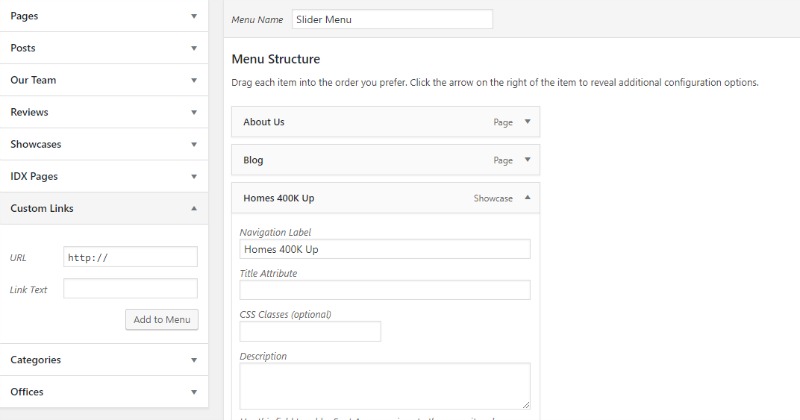
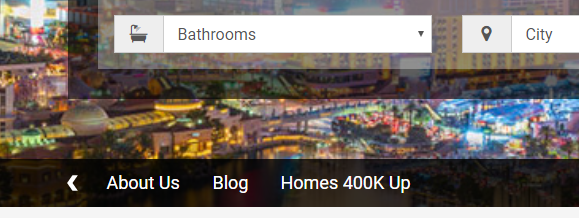
Give the new menu a name. I’m just going to call it slider menu and create the menu. Add pages to the menu — for example, place a check beside Blog from the left options and select Add to Menu. You can also create custom links by choosing Custom Links, adding a URL and Link Text. Add that to the menu. If you don’t want it to say the entire top title phrase for your menu choice, you can change the Navigation Label. For example, the page may be titled Homes for Sale 400K and Up, but you just want the menu button to say Homes 400K Up. Once you’ve added all menu items, click the blue Save Menu button.
Add Slider ID to Hero Element
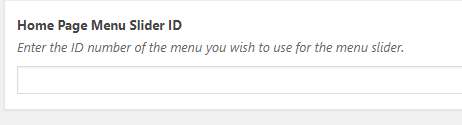
Now, you need the menu number that is found in the URL. This is menu 22, so I will copy that number. Next, in your WordPress dashboard, locate the BREW option, select Hero Element. Scroll down until you see Home Page Menu Slider ID. That ID is the number you copied from the menu’s URL. Place that number in the box and Update your page.
Your New BREW Menu Slider
Once you’ve done this, you’ll go to the main page of your BREW and see your new slider menu.
Have Questions? We can help!
I hope this has been a helpful tutorial for you. If you have questions, you can contact our team at team@ballenbrands.com or give us a call at 702-917-0755, and we’ll be happy to help!
Related Posts

Best Real Estate Website Builders (And Why Agents Keep Choosing Ballen Brands)
This guide breaks down the best options on the market right now, what they do well, where they fall short, and how to choose the one that fits where your business is actually headed
Your Website Should Sell You Before You Say Hello
Buyers and sellers vet you online long before they reach out. Your real estate website should answer their questions and build trust before you ever say hello.
Why Owning Your Own IDX Website Changes Everything About How You Generate Business
Having your own website with an integrated IDX search isn’t a nice-to-have. It’s the difference between renting your business and owning it.
What Expertise Should a Real Estate Website Company Have?
The company you hire should understand real estate, not only website design. A beautiful site matters, but your website also needs to support your business goals.

Best Real Estate Website Builders (And Why Agents Keep Choosing Ballen Brands)
This guide breaks down the best options on the market right now, what they do well, where they fall short, and how to choose the one that fits where your business is actually headed
Your Website Should Sell You Before You Say Hello
Buyers and sellers vet you online long before they reach out. Your real estate website should answer their questions and build trust before you ever say hello.

Why Owning Your Own IDX Website Changes Everything About How You Generate Business
Having your own website with an integrated IDX search isn’t a nice-to-have. It’s the difference between renting your business and owning it.

What Expertise Should a Real Estate Website Company Have?
The company you hire should understand real estate, not only website design. A beautiful site matters, but your website also needs to support your business goals.