Sabrina, Marketing Director for Ballen Brands, shows you how to edit the slug or permalink on a WordPress website’s page or post using the new Gutenberg editor.
This post contains some affiliate links for your convenience. Click here to read my full disclosure policy.
Editing Original WordPress Permalink
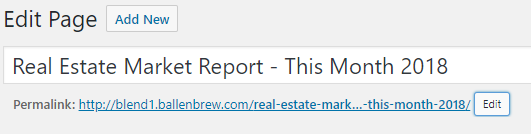
If you’re still using the older text editor for WordPress websites, you’ll notice that the permalink editor is located right under the title for the page or post. In this case, you click Edit and change the text inside the permalink box and either update or publish the page.
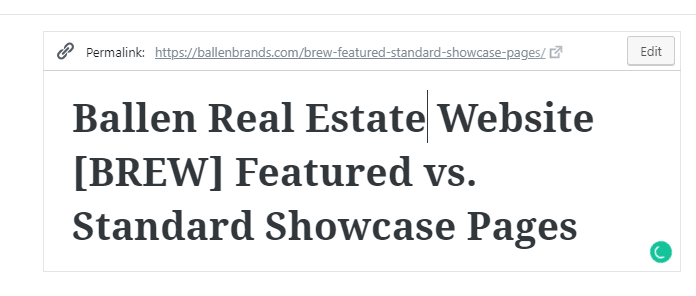
Gutenburg Permalink Editor
Create a new page or post and title it as you normally would. Save as a draft. If your page is previously published, you’ll go to the next step. Click on the title, and you’ll notice that the permalink option now appears. Click the Edit button on the right-hand side. Change the text inside the editing box. Click ok. Update or Publish the page.
Have Questions? Contact us!
I hope this has been a helpful tutorial for you. If you have questions, you can contact our team at team@ballenbrands.com or give us a call at 702-917-0755, and we’ll be happy to help!
Recent Posts

Best Real Estate Website Builders (And Why Agents Keep Choosing Ballen Brands)
This guide breaks down the best options on the market right now, what they do well, where they fall short, and how to choose the one that fits where your business is actually headed
Your Website Should Sell You Before You Say Hello
Buyers and sellers vet you online long before they reach out. Your real estate website should answer their questions and build trust before you ever say hello.
Why Owning Your Own IDX Website Changes Everything About How You Generate Business
Having your own website with an integrated IDX search isn’t a nice-to-have. It’s the difference between renting your business and owning it.
What Expertise Should a Real Estate Website Company Have?
The company you hire should understand real estate, not only website design. A beautiful site matters, but your website also needs to support your business goals.
Best Real Estate Website Builders (And Why Agents Keep Choosing Ballen Brands)
This guide breaks down the best options on the market right now, what they do well, where they fall short, and how to choose the one that fits where your business is actually headed

Your Website Should Sell You Before You Say Hello
Buyers and sellers vet you online long before they reach out. Your real estate website should answer their questions and build trust before you ever say hello.

Why Owning Your Own IDX Website Changes Everything About How You Generate Business
Having your own website with an integrated IDX search isn’t a nice-to-have. It’s the difference between renting your business and owning it.
What Expertise Should a Real Estate Website Company Have?
The company you hire should understand real estate, not only website design. A beautiful site matters, but your website also needs to support your business goals.