Catherine Chadwick, Project Manager for Ballen Brands, shows you how to duplicate (clone) a WordPress website page or post using a WordPress plugin called Duplicate Post.
This post contains some affiliate links for your convenience. Click here to read my full disclosure policy.
Install Duplicate Post Plugin
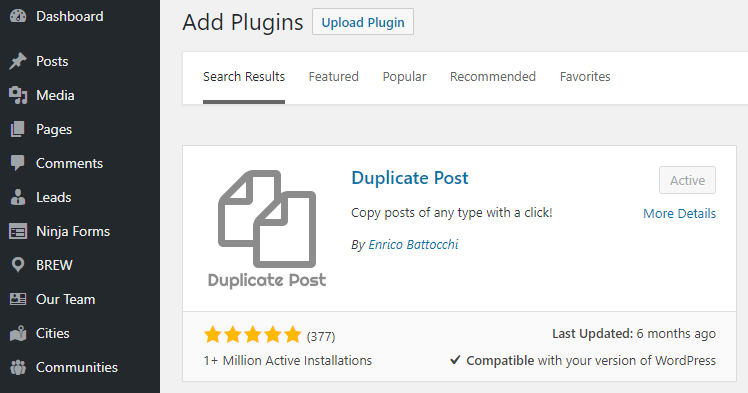
You want to be logged in to your WordPress dashboard. If you don’t already have it, you’ll want to download and install the Duplicate Post plugin for WordPress. There are several with the same name, so you’ll want to check to make sure it’s the one shown in this image.
Duplicate WordPress Page
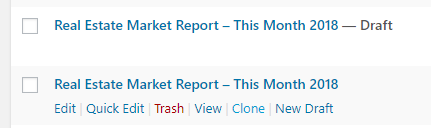
Go to Pages and All Pages to duplicate a page or clone it. For the purpose of this tutorial, I’m going to use the Real Estate Market Report – This Month 2018. When you hover under the title, you’ll see you have editing options. One of those is now Clone. Click the Clone button to create an exact copy of that page. The cloned page will be placed in Drafts.
Edit Title, Permalink, and Page Content
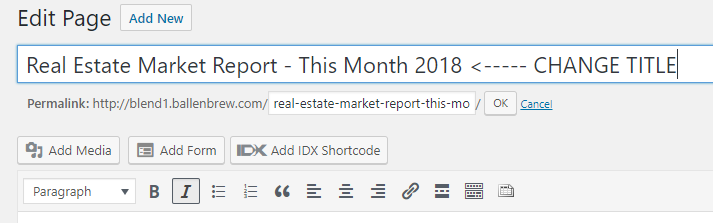
Edit the cloned page. Change the title, change the permalink, and edit the content or add new content to the page. Once changes are made, click Publish. Now, you have an exact clone of the original page with the edits you’ve made.
Have Questions? Contact us!
I hope this has been a helpful tutorial for you. If you have questions, you can contact our team at team@ballenbrands.com or give us a call at 702-917-0755, and we’ll be happy to help!
Recent Posts

Best Real Estate Website Builders (And Why Agents Keep Choosing Ballen Brands)
This guide breaks down the best options on the market right now, what they do well, where they fall short, and how to choose the one that fits where your business is actually headed
Why Owning Your Own IDX Website Changes Everything About How You Generate Business
Having your own website with an integrated IDX search isn’t a nice-to-have. It’s the difference between renting your business and owning it.
What Expertise Should a Real Estate Website Company Have?
The company you hire should understand real estate, not only website design. A beautiful site matters, but your website also needs to support your business goals.
How Long Has Your Real Estate Website Company Been in Business?
Your website can become the center of your online presence, helping support your branding, property search, lead generation, content marketing, local visibility, and client communication.
Best Real Estate Website Builders (And Why Agents Keep Choosing Ballen Brands)
This guide breaks down the best options on the market right now, what they do well, where they fall short, and how to choose the one that fits where your business is actually headed

Why Owning Your Own IDX Website Changes Everything About How You Generate Business
Having your own website with an integrated IDX search isn’t a nice-to-have. It’s the difference between renting your business and owning it.

What Expertise Should a Real Estate Website Company Have?
The company you hire should understand real estate, not only website design. A beautiful site matters, but your website also needs to support your business goals.
How Long Has Your Real Estate Website Company Been in Business?
Your website can become the center of your online presence, helping support your branding, property search, lead generation, content marketing, local visibility, and client communication.