Hello, this is Catherine Chadwick, project manager for Ballen Brands. Today I’m going to show you where you go to edit your market report, cornerstone page.
This post contains some affiliate links for your convenience. Click here to read my full disclosure policy.
Find Your Market Report Page
You want to be logged in to your WordPress dashboard. We’re going to go to our dashboard and locate our pages. Here on the left, you’ll see pages, you just want to click that, and what we’re going to do is find your main market report page.
Now this one’s easy. There’s never any pages here, but what we will probably do is just do a search for the market report so that it would pull up that page.

Your market report page will say your area real estate market report this month and the year most likely or however you named it, or if we named it, it’ll be very similar to that. You want to go into edit.
Edit the Page
This is where you’ll find all the information that is on that page and this is where you edit it, and here you can put in your new snippet for the month. That’s what we suggest and add the new link. Read more. It’ll go to your current report.
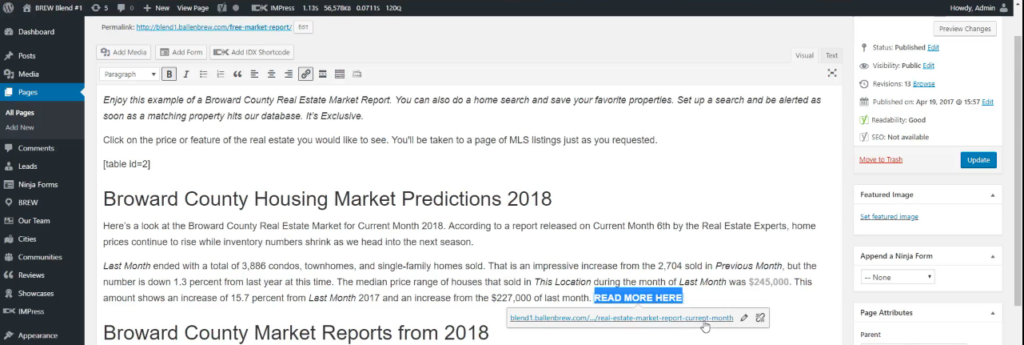
You will also want to update any widgets you have here. If you want to change your price for the month or something like that, that is where you update that information.
Edit the Table
Now you also have a table on this page that we’re going to go ahead and look at this page real quick so you can actually see on this end, we actually have a table here that covers the months, January, February, March, right here in this area.
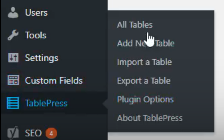
When you add a new month, you want to also update that table. That’s part of updating your cornerstone page. You would go back to your dashboard area and you want to find the TablePress.
Updating TablePress
Go to all tables and then find your market report one. We’re going to edit it and insert a link. Click “Ok”, and it’ll pull up in a box and you should see your recent report here. You would just click to put that in, add the name of the month, the year, and hit “Add Link”.
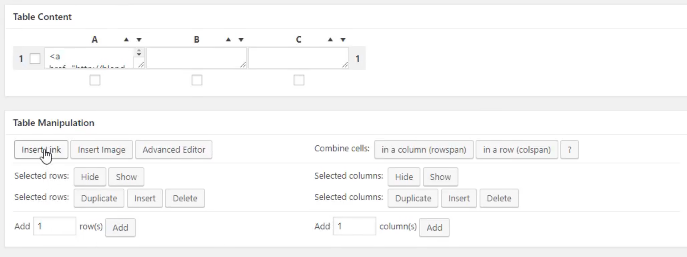
Once you’ve done that, you would save the changes and it will update that table on the page for you. I hope have you found this helpful and make sure you subscribe to our channel and like this video. Come back again for more helpful tips about your BREW and IDX Broker.

Best Real Estate Website Builders (And Why Agents Keep Choosing Ballen Brands)
This guide breaks down the best options on the market right now, what they do well, where they fall short, and how to choose the one that fits where your business is actually headed
Why Owning Your Own IDX Website Changes Everything About How You Generate Business
Having your own website with an integrated IDX search isn’t a nice-to-have. It’s the difference between renting your business and owning it.
What Expertise Should a Real Estate Website Company Have?
The company you hire should understand real estate, not only website design. A beautiful site matters, but your website also needs to support your business goals.
How Long Has Your Real Estate Website Company Been in Business?
Your website can become the center of your online presence, helping support your branding, property search, lead generation, content marketing, local visibility, and client communication.
Best Real Estate Website Builders (And Why Agents Keep Choosing Ballen Brands)
This guide breaks down the best options on the market right now, what they do well, where they fall short, and how to choose the one that fits where your business is actually headed
Why Owning Your Own IDX Website Changes Everything About How You Generate Business
Having your own website with an integrated IDX search isn’t a nice-to-have. It’s the difference between renting your business and owning it.
What Expertise Should a Real Estate Website Company Have?
The company you hire should understand real estate, not only website design. A beautiful site matters, but your website also needs to support your business goals.

How Long Has Your Real Estate Website Company Been in Business?
Your website can become the center of your online presence, helping support your branding, property search, lead generation, content marketing, local visibility, and client communication.